Facebook Login in Android App

Step#1 : Add this line to your project’s build.gradle file in dependencies section
compile ‘com.facebook.android:facebook-android-sdk:4.+’
Step#2 : Now generate your Key Hash for Debug and Release builds
Open Android Terminal :

For Debug Build(Go to your debug.keystore path in the terminal and then run this command):

keytool -exportcert -alias androiddebugkey -keystore debug.keystore | openssl sha1 -binary | openssl base64
For Release Build:
keytool -exportcert -alias <aliasName> -keystore <keystoreFilePath> | openssl sha1 -binary | openssl base64
NOTE : Make sure In Both case it must ask for password. If it does not asks for password that means something is wrong in command. Default password is android.
Step#3 : Add this code to your AndroidManifest.xml file
<activity
 android:name=”com.facebook.FacebookActivity” android:configChanges=”keyboard|keyboardHidden|screenLayout|screenSize|orientation”
 android:label=”@string/app_name” />
<provider
android:name=”com.facebook.FacebookContentProvider”
android:authorities=”com.facebook.app.FacebookContentProvider1234567890xxxx"
android:exported=”true” />
<meta-data
 android:name=”com.facebook.sdk.ApplicationId”
 android:value=”@string/facebook_app_id” />
Note: facebook_app_id we’ll be getting in our next steps.
Step#4 : Now go to your Facebook Account and get logged in
then open this link : https://developers.facebook.com/apps/
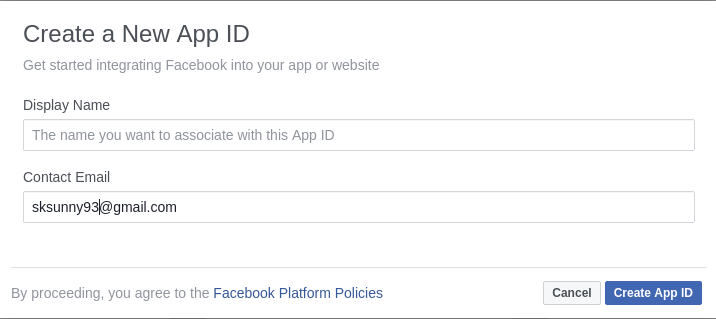
Step#5 : Now, Create a New App ID and hit Submit.
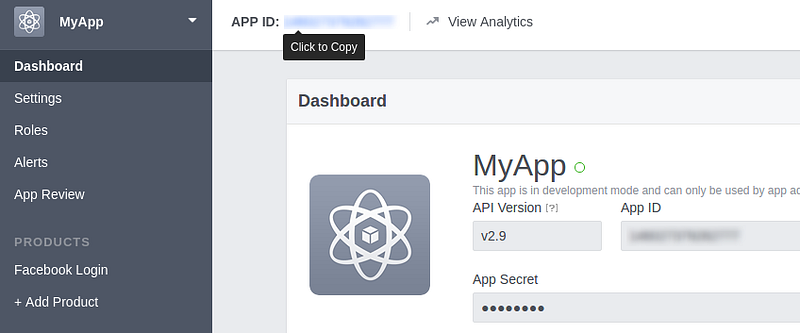
Step#6 : Copy that APP ID and paste it in the Step-3 code
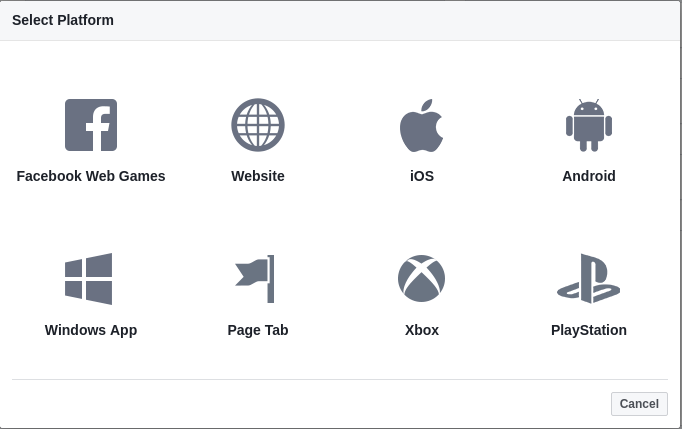
Step#7 : Now Go to Settings from Left-Hand Side Menu and Click ‘+Add Platform’ button and choose Android
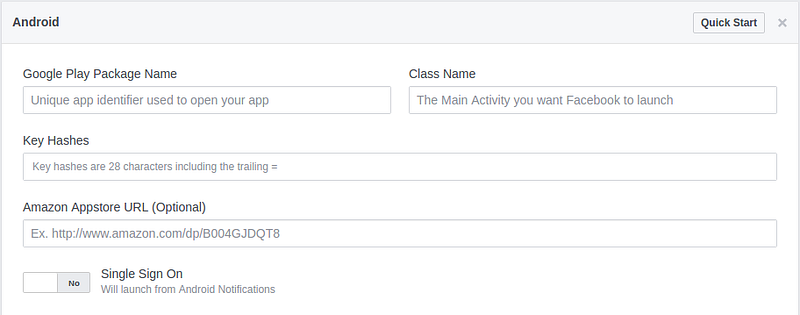
Note:
— Enter Package-Name of your App
— Enter Activity from where you want to Launch Facebook
— Enter Key Hashes generated in Step 2
— Turn ‘Single Sign On’ to Yes
— Enter Activity from where you want to Launch Facebook
— Enter Key Hashes generated in Step 2
— Turn ‘Single Sign On’ to Yes
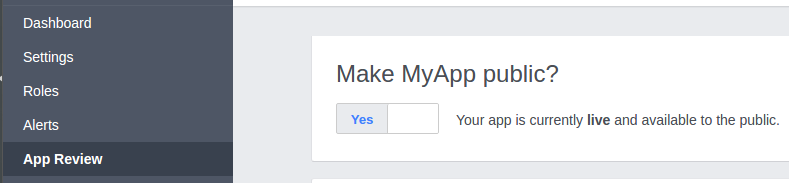
Step#8 : Now Go to App Review from clicking Left-Hand Side Menu and ‘Make your App Public’ switch to ‘Yes’ and Choose the App Category and hit Submit
Step#9 : Now come all over to your Android Project and place this code in your desired XML file
        <FrameLayout
            android:id="@+id/FrameLayout1"
            android:layout_width="match_parent"
            android:layout_height="wrap_content"
            android:layout_marginTop="@dimen/_10sdp">

            <com.facebook.login.widget.LoginButton
                android:id="@+id/login_button"
                android:layout_width="wrap_content"
                android:layout_height="wrap_content"
                android:visibility="gone" />

            <com.example.tasol.myrowitems.KudosButton
                android:id="@+id/fb"
                android:layout_width="fill_parent"
                android:layout_height="wrap_content"
                android:background="#416BC1"
                android:drawableLeft="@drawable/indo_facebook"
                android:paddingBottom="@dimen/_10sdp"
                android:paddingLeft="@dimen/_10sdp"
                android:paddingTop="@dimen/_10sdp"
                android:text="Log in with Facebook"
                android:textAllCaps="false"
                android:textColor="#ffffff"
                android:textStyle="bold" />
        </FrameLayout>
Note: This is a trick layout to use Facebook Default Login Button for customization, you can use default LoginButton if you want to implement it normally.
Step#10 : Now go to your respective java file and add this bunch of code on the button click
private LoginButton txtFbLogin;
private AccessToken mAccessToken;
private CallbackManager callbackManager;
txtFbLogin.registerCallback(callbackManager, new FacebookCallback<LoginResult>() {
 @Override
 public void onSuccess(LoginResult loginResult) {
       mAccessToken = loginResult.getAccessToken();
       getUserProfile(mAccessToken);
 }
@Override
 public void onCancel() {

 }
@Override
 public void onError(FacebookException error) {

 }
});
private void getUserProfile(AccessToken currentAccessToken) {
 GraphRequest request = GraphRequest.newMeRequest(
 currentAccessToken,
 new GraphRequest.GraphJSONObjectCallback() {
 @Override
 public void onCompleted(JSONObject object, GraphResponse  response) {
 try {
        //You can fetch user info like this…
       //object.getJSONObject(“picture”).
         getJSONObject(“data”).getString(“url”);
        //object.getString(“name”);
        //object.getString(“email”));
        //object.getString(“id”));
 } catch (JSONException e) {
     e.printStackTrace();
 }
}
 });
 Bundle parameters = new Bundle();
 parameters.putString(“fields”, “id,name,email,picture.width(200)”);
 request.setParameters(parameters);
 request.executeAsync();
 }
@Override
 public void onActivityResult(int requestCode, int resultCode, Intent data) {
      super.onActivityResult(requestCode, resultCode, data);
      callbackManager.onActivityResult(requestCode, resultCode,  data);
 }
Note : Use this line to LogOut from current facebook login :
LoginManager.getInstance().logOut();
This is it from my side and now you can do whatever you want to implement of your own with whatever facilities you wanna give your users using this Facebook Login.
Please Like, Share and Recommend with your buddies to help them out with this easy yet tricky process.
Kudosss To Everyone on Facebook
Comments
Post a Comment